Best Netflix Language Learning Extension
Get a clear guide to Best Netflix Language Learning Extension. Learn the key points, avoid confusion, and make it practical for learners.

Direct Answer
The wrong Netflix extension does not fail loudly. It fails quietly. You install it, feel productive for ten minutes, read more subtitles than usual, and still cannot say one useful line when the episode ends.
The best Netflix language learning extension is the one that fixes your smallest real bottleneck in one short scene. First make native Netflix playback usable. Then run the Tool-Fit Test for three minutes: choose one 30-90 second scene, try the practice manually, install one tool, and keep the tool only if it makes the same scene easier to replay, understand, save, say, or review. If the extension only adds more buttons, it is not the right tool yet.
Recognition is the trap. Recall is the test. The best Netflix language learning extension is not the one that shows you more. It is the one that makes you remember and say more.
Best Default Choice:
| Decision | Use this first | Why it works |
|---|---|---|
| Device | Desktop browser | Most learner extensions work best where pause, replay, and subtitle control are visible |
| Netflix setup | Target-language audio plus target-language subtitles | The extension should support practice, not replace basic Netflix setup |
| Missing subtitle language | Check FunFluen after native Netflix checks | On supported Netflix web sessions it may surface an existing Netflix subtitle track the standard menu does not show; if the language truly has no track, Premium can generate a machine-translated study subtitle |
| Scene | One short scene | A tool test needs a repeatable unit |
| First test | Manual replay before installing anything | You learn what friction the tool must reduce |
| Keep rule | Keep the tool only if one scene gets easier | Feature quantity matters less than practice flow |
Fast recommendation:
| If you mainly need... | Start with... |
|---|---|
| Subtitle help and dictionary lookup | Language Reactor |
| Sentence mining: saving useful real sentences for later review | Migaku |
| A subtitle language Netflix does not show in its standard menu | FunFluen |
| Speaking, recall, and active scene practice | FunFluen |
| A free habit test before tools | Native Netflix plus notes |
Quick fit: use this article if you are choosing a Netflix extension for language learning and want a practical test instead of a generic tool list. If your playback setup is still unreliable, start with How to Set Up Netflix for Language Learning. If your main question is subtitles, use Netflix Subtitles for Language Learning. If you are comparing Language Reactor and FunFluen directly, use Language Reactor vs FunFluen. For the full cluster path, return to Language Learning with Netflix.
Best Netflix Extension by Goal
If you came here for a direct recommendation, start here. The best choice depends on what is actually blocking the scene.
| Tool or path | Best for | Not best for | Test it with |
|---|---|---|---|
| Language Reactor | Subtitle support, dictionary lookup, dual subtitles, and playback controls | Learners whose main gap is speaking and recall | Can I understand this line faster? |
| Migaku | Phrase mining, sentence cards, and review workflows | Casual learners who do not want a card system | Can I save one useful line with context? |
| FunFluen | Additional Netflix subtitle-track access on supported web sessions, Premium translation fallback when a language truly has no track, speaking, recall, shadowing, and active scene practice | Pure dictionary lookup, full courses, or native TV/mobile-app workflows | Can I get the subtitle language I need and turn the line into practice? |
| Native Netflix plus notes | Minimal setup and casual practice | Learners who need replay, saving, or review support | Can I repeat this manually for a week? |
| Course or tutor plus Netflix | Structured progression | Learners who only want lightweight scene practice | Can Netflix support the lesson instead of pretending to be the lesson? |
Best overall for active learning: choose the tool that improves your weakest step by one point in the 3-Minute Extension Test below. Best FunFluen fit: learners who either cannot access the subtitle language they need through Netflix's standard menu or understand some Netflix scenes but cannot actively say the useful lines yet.
Who wins? If your bottleneck is understanding, start with Language Reactor-style subtitle support. If your bottleneck is saving and reviewing sentences, consider Migaku-style sentence mining. If your bottleneck is subtitle-language availability, speaking, or recall, FunFluen is the better-fit path.
We make FunFluen, so this page is naturally biased toward active practice. FunFluen is not affiliated with Netflix. The test below is designed to stay useful even if you choose Language Reactor, Migaku, native Netflix, or another browser extension instead.
Most Netflix language learning extensions work best in a desktop browser, especially Chrome-style extension environments, because replay, subtitle control, and practice overlays are easier to manage there. Do not assume the same workflow will work inside TV apps.
Why Extension Lists Can Mislead You
A long feature list feels reassuring, but language learning does not happen in the feature list. It happens in the moment when you pause a line, try to understand it, save something useful, and say it again without the screen carrying you.
That is why a popular Netflix language learning tool can still be wrong for tonight. A dictionary-heavy extension may be helpful when meaning is your bottleneck. A subtitle-control extension may be helpful when you need bilingual support. A speaking-focused tool may be better when you already understand the scene but freeze when you try to produce the line. And if the language you need is missing from Netflix's standard subtitle menu, the first question is whether the track exists but is not surfaced, or truly does not exist.
The better question is not "Which extension has the most features?" The better question is: "Which tool makes one real Netflix scene become usable practice?"
That is why this page is not a ranked listicle pretending one tool is best for every learner. It is a decision page: map the tool to the bottleneck, then prove it in one scene.
What a Netflix Extension Can and Cannot Fix
Before you test any Netflix extension for language learning, separate platform problems from practice problems.
| Problem | Can an extension help? | Better first move |
|---|---|---|
| The title has no target-language audio | No extension can create an official Netflix audio track | Choose another title or use the available audio honestly |
| The subtitle language is not visible in Netflix's standard menu | Sometimes | After native Netflix checks, see whether FunFluen can surface an additional existing Netflix subtitle track on a supported web session |
| The desired subtitle language genuinely has no track | FunFluen Premium can generate a separate machine-translated study subtitle | Treat it as a study aid, not an official Netflix subtitle; verify uncertain wording |
| Netflix subtitles do not match the audio | Sometimes easier to notice, not truly fix | Diagnose the mismatch first |
| You understand the scene but cannot say the line | A speaking or recall tool can help | Use a scene-to-speech loop |
| You keep saving too many words | A phrase workflow can help | Save one reusable phrase |
| You want a full course | Usually no | Use a course, tutor, or curriculum alongside Netflix |
| Replaying one line is annoying | Yes, if the tool supports line-level practice | Test line replay in one scene |
This is the trust boundary. FunFluen can surface an existing Netflix subtitle track on supported web sessions and can generate a machine-translated study subtitle when a language truly has no subtitle track. It does not turn that generated text into an official Netflix track, change Netflix licensing, or guarantee every title/device combination.
The Tool-Fit Test
Run this before deciding which Netflix language learning extension to keep.
Time needed: 3 minutes.
What you need: one Netflix scene, usable target-language audio, and one extension or manual setup to test. If the needed subtitle language is missing from the standard menu, include subtitle availability as part of the test rather than pretending the setup is already solved.
- Choose one short Netflix scene you already understand at least roughly.
- Watch it once with native Netflix controls only.
- Pick one useful line, not a whole conversation.
- If your needed subtitle language is missing, check whether it is an unsurfaced existing track or a genuine gap before judging the extension.
- Try to replay, understand, save, and say the line manually.
- Install or open one learner tool.
- Repeat the same line with the tool.
- Keep the tool only if the same practice becomes clearer, faster, or easier to repeat tomorrow.
The test is deliberately small. If a tool cannot improve one scene, it will not rescue a whole episode.
Worked Example
Scene: two friends argue after one person gave bad advice. The speaker wants to apologize without sounding fake. The line idea is: "I was not trying to make things worse."
You understand the feeling while reading the subtitle, but when you pause the video and try to say the idea yourself, your sentence collapses.
Practice line function:
| Moment | What you test | Example learner output |
|---|---|---|
| Understand | What is the speaker doing? | They are explaining that they did not want to make the situation worse |
| Recall | Can I say the idea without reading? | "I was not trying to make things worse." |
| Own | Can I use it in my life? | "I was trying to help, but I made it worse." |
This is the gap an extension should expose and train. More subtitles may help you recognize the line. A better practice tool helps you recall it, say it, and return to it tomorrow.
Tool-specific sequence:
| Path | How to run the same line |
|---|---|
| Native Netflix | Pause manually, hide the subtitle with your hand or notes, replay with the timeline, and write "make things worse" in your notebook |
| Language Reactor | Use subtitle, replay, and lookup support to understand the line faster, then hide or ignore subtitles and say it yourself |
| Migaku | Save the sentence or phrase into a review workflow, then check tomorrow whether you actually review it |
| FunFluen | If the support language is missing, check for an additional existing Netflix track or Premium translation fallback; then turn the line into recall and speaking practice: guess it, shadow it, save the phrase, and return to it later |
If a tool cannot make that sequence easier, it may still be useful, but it is not solving this bottleneck.
3-Minute Extension Test
Use this quick scoring test for any Netflix extension for language learning.
| Signal | 0 points | 1 point |
|---|---|---|
| Setup clarity | You cannot tell what to do first | Audio, subtitles, and scene controls are obvious |
| Subtitle availability | The language you need stays a dead end | The tool clearly distinguishes an existing Netflix track from a generated study fallback |
| Line replay | You still fight the timeline | Replaying one line is easier |
| Meaning check | You still guess blindly | You can check meaning without leaving the scene |
| Phrase saving | You lose the useful line | You can save or mark one phrase |
| Recall pressure | You only read | The tool helps you hide, guess, speak, or test memory |
| Tomorrow review | Nothing carries over | One phrase or scene can be reviewed later |
Score 0-2: do not keep the tool for active practice yet. It may be useful for casual watching, but it did not solve the learning bottleneck.
Score 3-5: keep testing for a week. The tool helps, but only for a narrow job.
Score 6-7: this is a strong fit for your current Netflix routine.
Pass rule: keep the tool only if it improves your weakest step by at least one point. A tool that looks impressive everywhere except your actual bottleneck is still the wrong tool tonight.
Extension Decision Matrix
| Your bottleneck | Best tool type | What to test |
|---|---|---|
| You cannot understand the line | Subtitle and meaning support | Can you check meaning quickly without leaving the scene? |
| Netflix does not show your needed subtitle language | FunFluen on a supported Netflix web session | Can it surface an existing Netflix track, or clearly provide a Premium machine-translation fallback when no track exists? |
| You understand but cannot hear fast speech | Replay and subtitle control | Can you replay one line and then check the subtitle? |
| You save too many words | Phrase-saving workflow | Can you save one phrase with context? |
| You understand but cannot speak | Speaking and recall workflow | Can you say the line before seeing it again? |
| You want structured lessons | Course or tutor | Does the tool actually teach, or only decorate Netflix? |
| You watch on TV or mobile | Native Netflix plus notes | Does the extension work where you actually watch? |
For many learners, the right answer changes by level. Beginners need support and shorter scenes. Intermediate learners need output pressure. Advanced learners need tone, register, speed, and review.
For choosing good scenes before you test tools, use Best Netflix Shows for Language Learning. For turning saved lines into actual vocabulary practice, use Learn Vocabulary from Netflix. For the speaking loop after the tool test, use Practice Speaking with Netflix.
UI Check: What the Tool Should Make Easier
The best language learning extension for Netflix should make the practice move visible. You should not need to remember a complicated system while the scene is moving.
The screenshots below are from FunFluen, our own product. They are included as examples of the kind of practice surface to look for, not as screenshots of every tool mentioned on this page. You do not need this exact interface, but the tool should make one learning action obvious: replay, hide, recall, speak, save, or review.
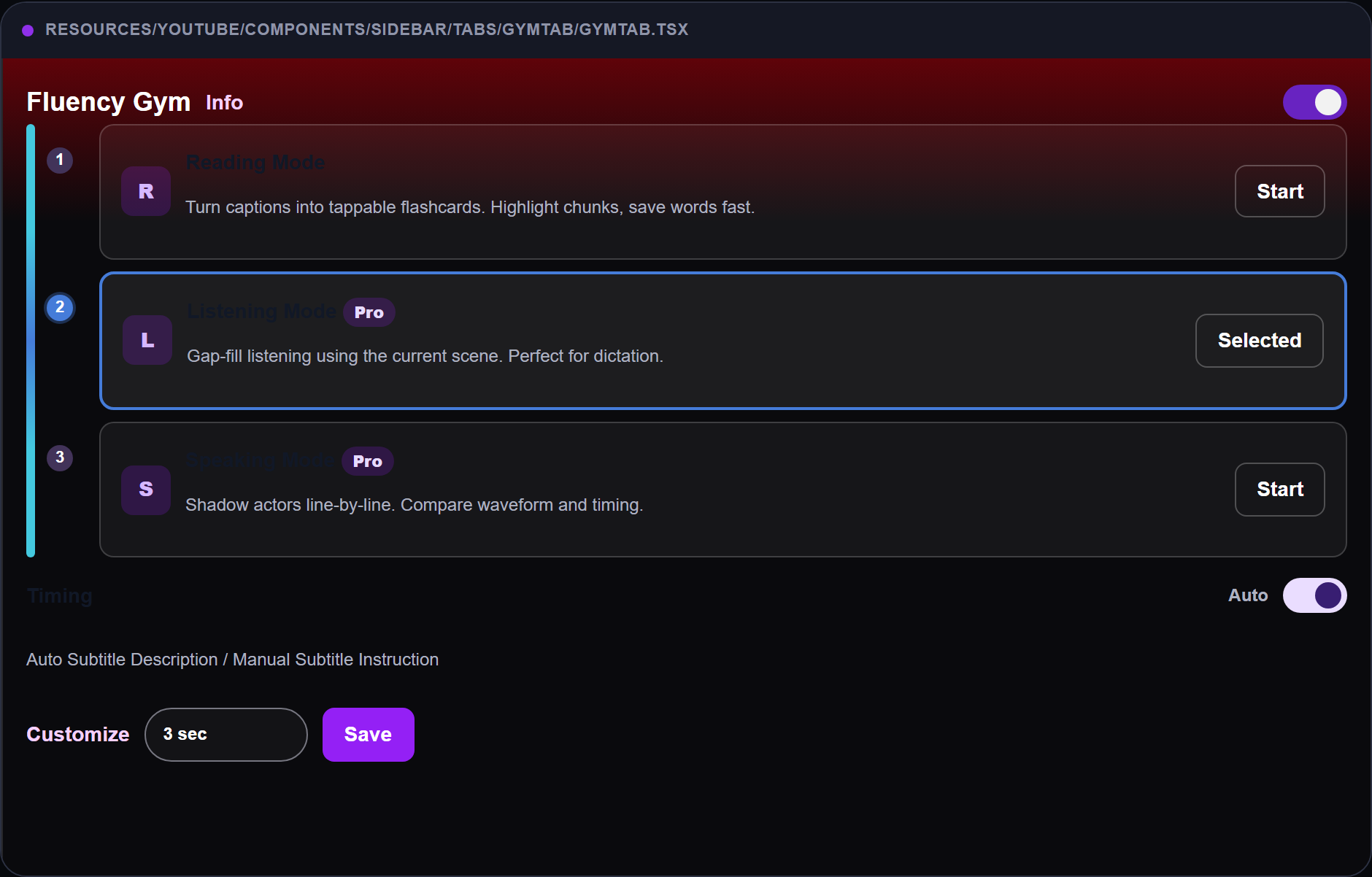
Look for a clear practice surface: the learner works with one scene line as a practice unit instead of passively watching the full episode.
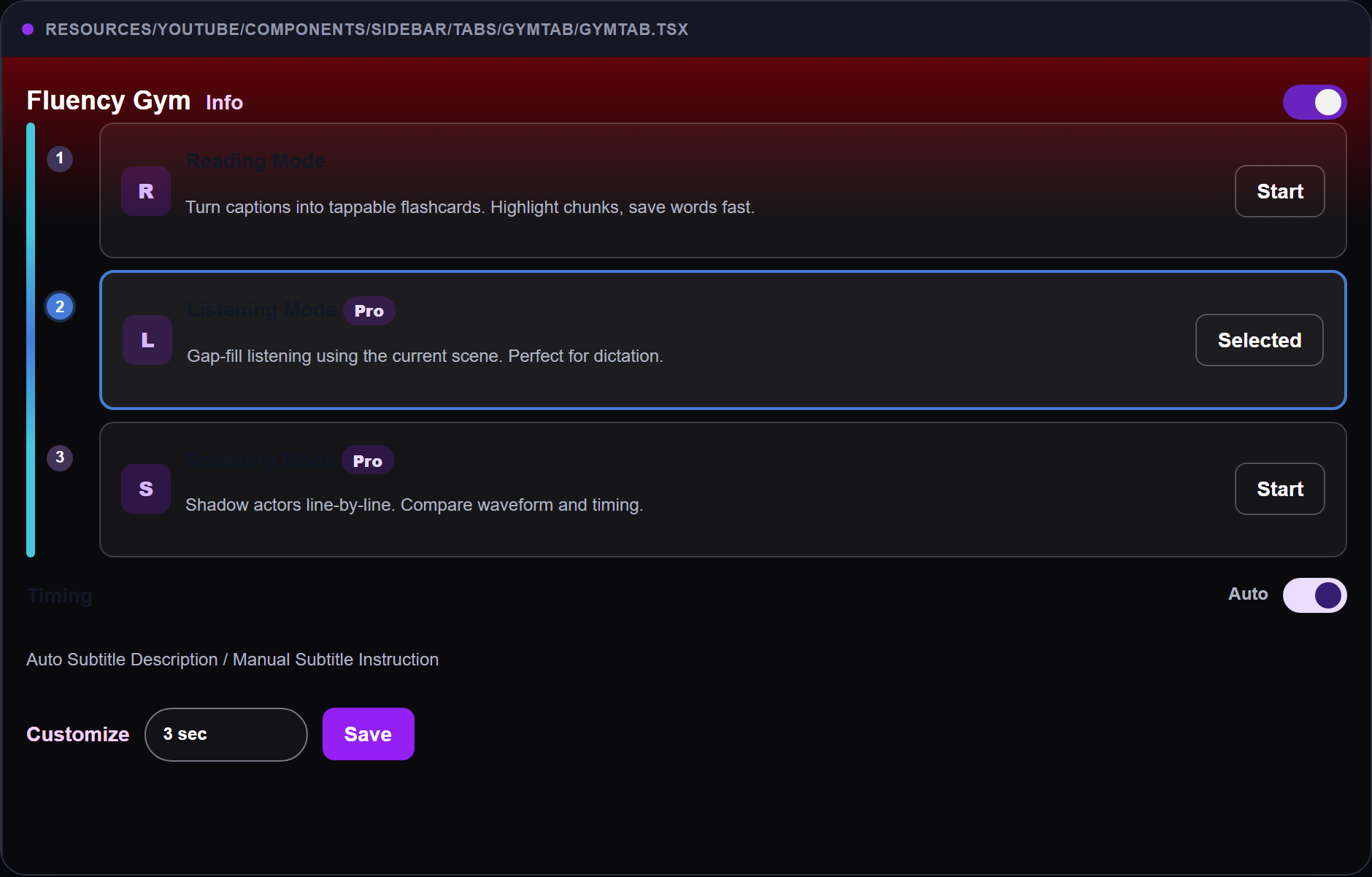
The UI should create a small learning moment: the subtitle stops being the answer key and becomes a cue for recall. If the interface only adds more text around the video, ask whether it helps you speak, recall, or review anything after the scene ends.
Success Check
After one scene, a good Netflix extension should pass this practical check:
| Question | Good sign | Warning sign |
|---|---|---|
| Did setup get easier? | You know the audio and subtitle state | You are still guessing what is active |
| Did subtitle availability become clearer? | You know whether the track is existing, hidden from the menu, or machine-generated | The tool blurs official Netflix tracks and generated text together |
| Did replay get easier? | One line is easy to repeat | You keep dragging the timeline |
| Did meaning get clearer? | You can check without leaving the scene | You open three extra tabs |
| Did practice become active? | You say, guess, shadow, or recall | You only read more subtitles |
| Did review survive? | One line is ready for tomorrow | Nothing remains after watching |
The extension has one job: make the useful behavior more repeatable.
Best Setup by Goal
| Goal | Audio | Subtitles | Tool priority |
|---|---|---|---|
| Understand the scene | Target-language audio | Native or dual support if needed | Meaning check |
| Access a missing support language | Available target-language audio | Check existing Netflix tracks first; use clearly labeled Premium translation only if no track exists | Subtitle source clarity |
| Train listening | Target-language audio | Target subtitles after first listen | Replay and subtitle reveal |
| Save vocabulary | Target-language audio | Target subtitles | Phrase capture and review |
| Practice speaking | Target-language audio | Hidden or delayed support | Recall, shadowing, and speaking |
| Build a habit | Easier title | Support that keeps you moving | Small daily loop |
If you already understand the scene and want to find your gap fastest, test one speaking or recall step after meaning is clear. Recognition alone can feel like progress even when your own sentence is still missing.
Where FunFluen Fits Best
The extension test works with Netflix alone: choose a scene, replay a line manually, write one phrase, hide the subtitle, and try to say the line. Do that first so the tool has a real job.
Netflix gives you the scene. FunFluen can expand the subtitle options on supported web sessions and turn that scene into a repeatable practice station.
FunFluen has two distinct subtitle fallbacks. If a Netflix subtitle track already exists but is not exposed in the standard Netflix menu, FunFluen can surface that existing track inside its subtitle layer on supported web sessions. If the desired language genuinely has no subtitle track, FunFluen Premium can generate a machine-translated study subtitle. The generated translation is not an official Netflix subtitle and may contain errors, especially with names, slang, jokes, or ambiguous dialogue.
FunFluen is also strong when your bottleneck is not "What does this line mean?" but "Can I say this line myself tomorrow?" It is useful when you want the same scene to become a subtitle, replay, phrase-saving, recall, and speaking loop. FunFluen does not change Netflix licensing, make unavailable titles appear, replace a course, or guarantee perfect subtitles.
| Tool problem | Manual Netflix path | FunFluen helps with |
|---|---|---|
| Needed subtitle language is not visible | Check Netflix profile/title/device settings | Surface additional existing Netflix tracks on supported web sessions; use Premium machine translation only if no track exists |
| Replaying one line is clumsy | Pause and drag manually | Line-focused replay support |
| Subtitles carry the whole session | Hide or ignore them yourself | Cleaner subtitle layers for practice |
| Useful phrases disappear | Save them in a note app | Save phrases for later review |
| Practice stays passive | Force yourself to speak | Speaking and recall pressure |
| Tomorrow review gets skipped | Build your own reminder | Return to the saved phrase loop |
Manual vs FunFluen Version:
| Step | Manual version | FunFluen version |
|---|---|---|
| Choose | Pick one short Netflix scene | Use the same scene |
| Subtitle source | Use whatever Netflix exposes | Check additional existing Netflix tracks; if the language truly has no track, use a clearly labeled Premium translation |
| Replay | Drag back to one line | Repeat the line with less friction |
| Check | Reveal subtitles manually | Use learner-friendly subtitle support |
| Save | Copy one phrase somewhere | Save the phrase with context |
| Speak | Cover the subtitle and say it | Use guided speaking support |
Who Should Not Choose FunFluen First?
Do not choose FunFluen first if your title has no usable target-language audio and you specifically need that official audio track, you want a full beginner course, you mainly watch in the native Netflix TV/mobile app, or you only want quick dictionary popups while watching casually.
If the subtitle language is missing, however, do not treat that as an automatic reason to leave. First check whether FunFluen can surface an existing Netflix subtitle track on a supported web session; if the language truly has no track, decide whether a clearly labeled Premium machine translation is good enough for your study goal.
Common Extension Mistakes
Installing before setup works. If native Netflix playback is broken, the tool test becomes confusing. Assuming “not in the menu” means “no track exists.” Check the subtitle source before giving up. Choosing by feature count. More features do not matter if one line is still hard to replay and use. Reading more instead of speaking more. A Netflix language learning extension should create active work, not only more subtitles. Keeping three tools at once. Test one tool against one scene before building a messy stack. Ignoring tomorrow. If nothing carries into review, the session was probably entertainment with notes.
FunFluen is not affiliated with Netflix. Availability, audio, subtitles, and extension behavior can vary by country, browser, device, and title.
FAQ
What is the best Netflix language learning extension?
The best Netflix language learning extension is the one that solves your current bottleneck. Use the Tool-Fit Test: one short scene, one useful line, one tool, and one clear improvement in subtitle availability, replay, understanding, saving, speaking, or review.
Is FunFluen better than Language Reactor?
It depends on the job. If you want a direct comparison, read Language Reactor vs FunFluen. In simple terms, choose based on whether your bottleneck is dictionary/meaning support, subtitle availability, subtitle control, or active speaking practice.
Do I need an extension to learn with Netflix?
No. You can practice with native Netflix controls, subtitles, and a note app. Add a tool only when the manual method works but the friction makes it hard to repeat.
Can an extension fix missing Netflix subtitles or audio?
No extension can create an official Netflix audio track or change Netflix licensing. For subtitles, distinguish a track that exists but is not shown from a language that truly has no track. On supported Netflix web sessions, FunFluen may surface an additional existing Netflix subtitle track; when no track exists for the desired language, Premium can generate a separate machine-translated study subtitle. That generated text is not an official Netflix subtitle and may contain errors.
Should beginners use a Netflix language learning extension?
Beginners can use one, but only after choosing very easy, familiar scenes. If the scene is mostly noise, use the beginner Netflix bridge before testing tools.
What should I test before paying for any tool?
Test one real scene. Can you access the subtitle support you need, replay one line, check meaning, save one phrase, say it without reading, and review it tomorrow? If not, do not judge the tool by its feature page.
Try the Tool-Fit Test
Tonight, choose one Netflix scene and run the 3-Minute Extension Test.
Want to test manually? Keep the tool only if one line becomes easier to access, replay, understand, save, say, or review.
Explore more language-learning guides in Media-Based Language Learning.